Thursday, June 22, 2006

the start of my digital diary

A few weeks ago I thought it might be a good idea to compile my daily life in a digital photo diary. It would reside only on my computer, and not be available publicly.

The main advantages for this diary, for me, were:

1. A digital album as a permanent and interesting archive for our family.
2. I wouldn't have to keep a text diary, because each picture would act as a memory jogger by association. (Since sometimes I can barely remember what I did last week, any form of visual kicker would be a real advantage. That's proven to be true enough so far).

According to Microsoft researcher Gordon Bell, 72, of MyLifeBits, his own life diary project increased his recall of almost everything in his life. And his family noted that his memory improved. That's good enough for me.

My first step was to download Picasa, Google's free photo album. Once it was installed, it went out and found over 2500 photos on my hard drive which it then compiled into folders and arranged by date. It found many hundreds of Jpeg's that I had completely forgotten about... and my hard drive is barely 2 years old.

I decided that by cataloging chronologically by day and month, then labeling each photo with a number of keywords, I would have a fairly good way of finding anything fast. It also aided memory retention by grouping the photos in a daily view.

After a few false starts and a bit of experimenting, my captioning system ended up being in this order:
- the date... Fri 23 Jun 06,
- followed by listing the people or items in the shot, from left to right,
- followed by the location.

For example: Fri 23 Jun 06, Judy, Rachel, Michael, lounge, Drivet Court.jpg

This way I could find all photos which contained, say, Judy, then allow Picasa to sort them all by date. It's remarkably efficient so far.

Each day has its own folder which appears on Picasa's index in the lefthand window - so finding a date is very fast.

Then I started taking photos of what I considered were important events each day. Since my Canon Powershot A40 camera was a bit large and heavy for convenience snapping, I bought a Sony DSC-T7. This 5 megapixel ultra-compact camera is about the size of a credit card and a third of an inch in thickness. It's perfect for the job... I can slip it in my shirt pocket, and because it has the fastest take-up time of any digital camera, I can be shooting in less than a couple of seconds.

The visual diary is only one part of my "Digital Diary" project. The other part was becoming paperless. I started this about a year ago, and now have all my bills, accounts, receipts and most paper items in PDF form. Again, I captioned these PDF's in a similar manner to my photos, and find that I can locate any item within a few seconds.

I'll talk more about my progress in detail in future posts, after I get back from overseas in about three week's time. In the meantime, here's a current screenshot of my diary. It not only contains photos, but also:
- web pages
- Outlook contacts and notes
- newspaper clippings (photographed with the Sony--much quicker than scanning)
- location maps (our Yellow Pages has a mapping facility)
- tv screenshots of programs I watched.

More about all this in detail later when I get back (and probably after I catalog several hundred holiday shots!)


UPDATE: Sunday 27 May 2007 - For several months I have not been able to access Picasa on my computer (Windows XP Home), despite many reboots and downloads. I have effectively lost all the tags and organisational ability of Picasa, and it is very dispiriting. I'm looking into using Flickr and leaving all my photos online to avoid this happening again.

shock writing

I wrote today for the first time in many weeks.

When I say I WROTE... let me explain. I hand-wrote.

I had to fill out a form by hand, and yes...the experience came as a shock. My handwriting has deteriorated - just as my typing has because I use Dragon Naturally Speaking dictation software almost exclusively now.

'Use it or lose it' came to mind.

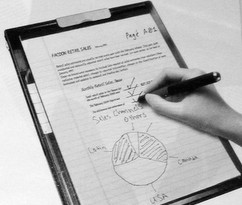
This illustration shows a Laser DigPAD which turns handwriting into text, and archives your doodles and charts. Guess I won't be needing one.

Thursday, June 08, 2006

small things that make a big difference

A few posts back I talked about the browsers I use. My main browser of choice is Opera... I've been using that for a couple of years for its main advantage - speed.

Opera is 2 to 3 times faster than Internet Explorer. But it's not perfect. Sometimes it doesn't format some web pages correctly, often leaving essential buttons invisible. This blog is a good example... the button that allows me to insert graphics on a new post is not there.

So sometimes I use Firefox for the Alexa and Page Rank data it provides, and on very few occasions, Internet Explorer.

What is keeping me using Opera when it exhibits these flaws? The answer is gestures... this is the only browser which allows you to control it using the mouse gesture.

For example, if I want to close a page, I simply scribe the letter "L" with the mouse while holding a left click, and the page vanishes. If I want to create a new page, I simply left-click and hold, while drawing the mouse down vertically.

There are many other gestures, but believe me - these small actions simplify and speed up my browser work dramatically. Take Opera for a test ride... you may be converted.

Tuesday, June 06, 2006

the wave of the future

If you want to get more out of your words, you need to make the written word interesting to read...brighten up the way it is presented. For example:

  • put your text into bullet points.
  • shorten your paragraphs down to 2 or 3 sentences.
  • use ellipses, color, bolding, italics, underlines and capitals in your text.
  • increase the number of subheadlines you use.

  • But most importantly - in this visual age - you've got to use graphics. Photographs, illustrations, line drawings, graphs, screenshots, video. They all help to make the web page more interesting and powerful.

    In this blog - and more particularly my lotto blog - I've started using graphics in a big way. Take a look at my Honest Lotto System blog.

    If you don’t have material from your own resources, you can get plenty of royalty-free photos and illustrations here:
    - yotophoto.com
    - sxc.hu
    - morguefile.com

    I use Photoshop to scale down full-size graphics, but you can also use a free service called JPEG Wizard

    If you use Google's Blog to produce your blog, you can pull graphics files straight off your hard drive and have them automatically sized by this system.

    Marketer Mark Joyner uses a daily cartoon and a small accompanying message in his blog. He relies on a link to his forum to generate discussion.
    I believe this is the wave of the future... video and graphic illustration will become more powerful now that broadband is relatively cheap.

    Don't underestimate the power of a picture!

    Monday, June 05, 2006

    how to develop a gut feeling for profit

    We often hear about a businessman having a gut feeling about a particular enterprise. This explains how some people can make money from an opportunity, and the rest of us don't.

    A gut feeling is easily developed. All you need to do is read a lot, mix a lot, and constantly experiment with different opportunities. After a while you get a feel for what works and what doesn't. So here's the point of this post...

    I figure there are two types of people who make money on the internet... or for that matter in any media. The first is proactive, action related, a fast mover. They tend to jump on opportunities as they first develop, and make big money until the trend quickly drops away.

    The second--which is more my type... waits to see how a new trend develops, and if it looks profitable then climbs (cautiously) on the bandwagon. There can be much profit in both setups... just depends how quickly you want to accumulate the experience and financial benefits.

    Which works best? Here's an example...

    Over the years I've bought a lot of products, and looked at a lot of opportunities. In my business - e-book publishing - the current trend is to write articles with a byline and link, and post them on article directories. As the articles are taken and published by other entrepreneurs who need them, the link acts as a powerful search engine benefit... pushing your web site higher and gaining more traffic.

    I've always thought that duplicate content produced this way would ultimately act negatively against the writer. So in the six months to a year that the article trend has been active, I haven't done anything about it.

    While I might have lost the short-term opportunity, I'm actually better off.

    What I figure will happen is this... the search engines will act to reduce the ranking position of web sites which have duplicate content pointing to them.

    This means if you happen to get to number 10 rank in Google because of all the articles you have written and the promotional back links you gained, you will see your position drop as Google downrates your importance.

    Multiple articles will actually act as a negative influence.

    So now we wait to see whether this will happen. Call it gut feeling, or experience?

    If so, it means that the long-term strategies I've been doing for many years are still the best. In the meantime I have a bunch of largely useless short-term products sitting on my hard drive!

    Tuesday, May 30, 2006

    success the Gary Halbert way

    Why do some people make a lot of money in business, and others don't?

    What distinguishes the successful from the not?

    And why can 100 people read the same book, or take the same course... and only one succeed?

    I believe it has nothing to do with talent. It has a lot to do with persistence, but that's not the reason either.

    The answer - for our marketing business - is: PERSONALITY.

    This is the distinguishing attribute between the winners and losers.

    The world is full of people with similar talents. The internet is rapidly showing how very many of us all think alike. Millions of us write the same, spell the same [think how many people can't use 'lose' correctly and spell 'loose' instead], and produce identical web sites... millions of us. Identical.

    To stand out from the crowd, we need to show our true personality, and the weirder it is - the better.

    To see how well an off-center personality can succeed, take a long look at The Gary Halbert Letters. Gary - by his own admission - is the best copywriter in the world... and he often presents a crazy attitude in his writing.

    But his unique personality shines through, and people hire him for millions of dollars. He's worth studying.

    While you're there, take a look at the Rolls-Royce letters. Read and learn from a master.

    ----
    UPDATE: Sadly Gary passed away in April 2007 at age 63.
    ---

    Wednesday, May 24, 2006

    what's a Single Action website?

    Home Publishing SecretsOne advantage in being around a long time is that you get to see the same things repeating themselves. The current trend is something called a "Single Action" web site.

    I've been doing this for 10 years so it's nothing new to me - except that very few people know how to do it successfully.

    I'm going to reveal the secrets now. But you won't need to write them down... it's all pretty simple.

    Here's the secret:

    1. Devote your web site sales page to one product only.
    2. Never deviate from selling that product only.
    3. Do not put another product on that page.


    So what happens when you get a visitor to this kind of website? Yes... you guessed it...either the prospect wants the product, or they don't.

    The outcome is simple if they do.

    If they don't, you must have a way to attract them at another time. For that you use an opt-in mailing list with an autoresponder sequence of selling messages.

    OK, the structure of such a setup is a bit more complicated. But mainly it's pretty simple. My "Home Publishing Secrets" is a good example of that. Take a look.

    Tuesday, May 23, 2006

    tool of the century

    If there's one tool I absolutely can't do without, it's a tiny application called ShortKeys. You store any kind of text... URLs, signatures, sentences, paragraphs, names, unusually spelled names... under any kind of keyword that you prefer.

    When you enter that keyword, ShortKeys retrieves your full text and pastes it into practically anything... webpages, emails, toolbars.

    Now, that all seems very convenient, but unless you can remember your keywords, it's not much use. So defining the keyword is the secret.

    I have what appears to be a complex set of keywords, but to me they are entirely logical. For example:

    I use W to indicate a URL. then I used the first letters of the web site. So:
    wks typed will give me "http://www.kensilver.com."
    wct will type "http://www.copywritingtool.com."

    Using this simple code, you can produce anything. I found my typing workload has decreased by at least half. And of course, I never make a mistake in important text, like my signature files.

    Sunday, May 21, 2006

    home (self) publishing secrets

    I wrote "How To Make $100,000 A Year Part-Time Creating Profitable How-To Manuals" about 10 years ago, and it was a very popular e-book. It's still available from me here: Home Publishing Secrets

    I found one of the most effective ways to reduce refunds on a physical product - as small as they were for me at the time - was to shrinkwrap the manual. You can apply the same principle to any hardcopy product. Read more about that tip at Home Publishing Secrets

    Saturday, May 20, 2006

    what's this browser doing so high in my top 5?

    I got a surprise today when I looked up my browser stats from visitors. Internet Explorer was top dog of course, but in 2nd place was a relative newcomer over the last year - Firefox. Here's the percentages for the top 5 as they figure in my website life:

    Internet Explorer - 86.3 %
    Firefox - 9.5 %
    Netscape - 1.4 %
    Safari - 1.2 %
    Opera - 0.5 %

    They all have their uses. I use each one separately for different purposes:

  • Opera as a daily browser for its speed (it's 2-3 times faster than IE!)
  • Firefox for its built-in Google Page Rank and Alexa toolbar, and keyword density calculator. More about that later.
  • IE for some operations that Opera won't do for some unknown reason. For example, Opera won't allow me to add a new newsletter in my favorite autoresponder, GetResponse

  • I test every new webpage through these 3 browsers before releasing them to the world, and I recommend you run your webpages through the top 3.

    I'll be writing about many more tools in upcoming posts, but it's surprising how few you need to run a profitable internet business.